Microblading App
- 3.0
- Rating
- 50.00K
- Installs
- Free
- Price
 Analysis by App-foxy
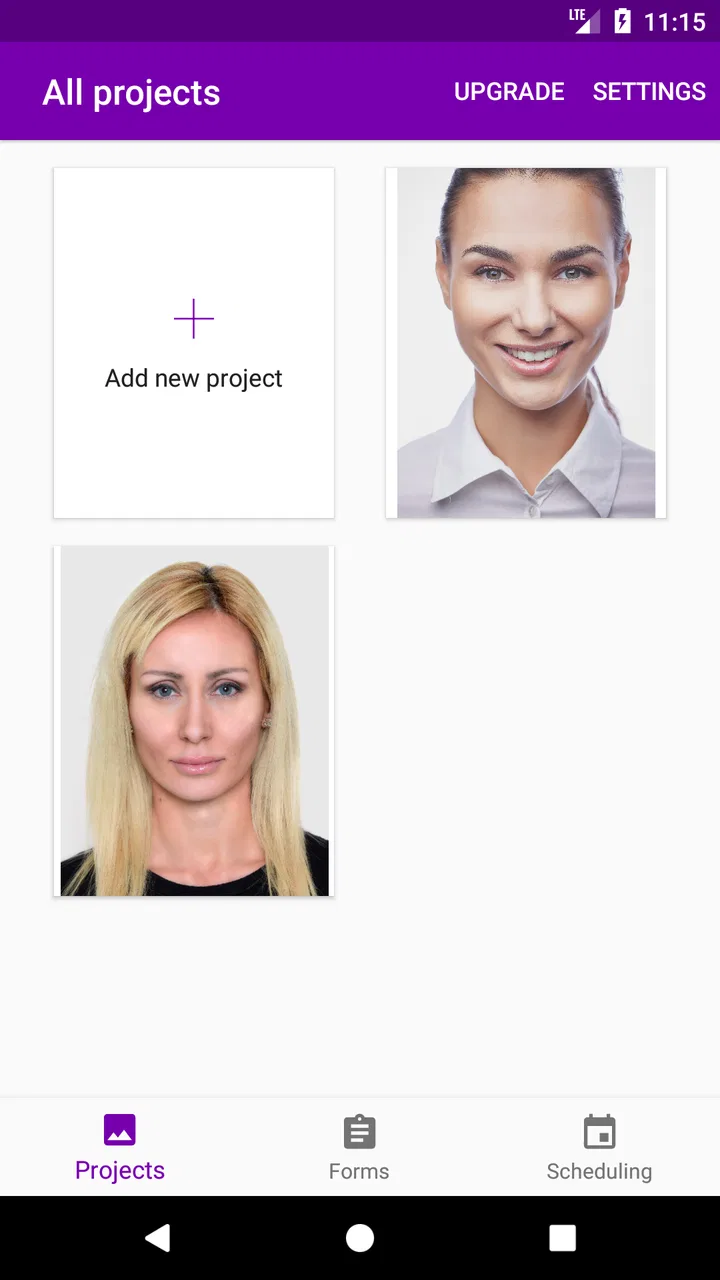
When I first looked at Microblading App, I expected a narrow beauty tool aimed mainly at brow artists. That is still the clearest audience, but its real value is more practical: it tries to move client consent and related paperwork away from printed sheets and into an email-based workflow. For a small beauty business, that can remove a surprisingly annoying part of the appointment process.
The app comes from Ana Perrone and is listed as a free beauty app for everyone. It has passed the early-experiment stage in one important sense, with over fifty thousand installs, although its average rating sits at three out of five from around one hundred thirty ratings. I read that combination as a useful warning: plenty of people have tried it, but the experience is not universally smooth.
My overall impression is that this is a focused utility rather than a complete salon-management system. If you perform microblading and want a paperless consent step, it may fit neatly into your routine. If you need scheduling, payment processing, detailed client records, inventory, or a broad range of cosmetic services, you will probably find its scope too limited.
You May Also Like

 Blood Strike: 2.5 Anniversary
Blood Strike’s Loadouts Turn Every Drop Into a Tactical Gamble
A close look at Blood Strike’s custom loadouts: how fast access to signature weapons reshapes its battle royale rhythm, rewards preparation, and narrows the gap between fights.

 Pandora - Music & Podcasts
Pandora’s Music Is Easy to Start, but Harder to Recover
Pandora’s strength is its low-effort path from a seed to a station. Its weak spot is how much confidence it asks you to place in connection, setup, and quiet recovery.

 8 Ball Pool
 Is Built on Rivalries, Rematches, and Routine
A close look at the rivalries, rematches, shared routines, and unanswered safety questions that turn a quick pool match into a persistent mobile community.

 Samsung Music
’s Quiet Strength Is Playing What You Already Own
Its reach comes less from spectacle than from dependable access to a personal library. That simplicity is both the app’s strongest retention engine and its ceiling.

 AccuWeather: Weather Radar
AccuWeather Review: A Quick, Clear Forecast for Everyday Decisions
For everyday plans, the best forecast is the one you can understand quickly. AccuWeather makes rain timing, radar, and local conditions easy to act on, with a few trade-offs.

 Hill Climb Racing
Why Hill Climb Racing Still Turns Crashes Into One More Run
A tiny car, a bumpy hill and one more upgrade: Hill Climb Racing keeps resurfacing because its simple chaos makes every near-miss feel personal.
More From Our News Desk
View All News


How the current app fits into a brow appointment
The most sensible way to use this app is before the treatment begins. Instead of handing a client a printed consent form at the studio, I would use the app as part of the booking or arrival routine, sending the relevant form by email so the client can review it away from the treatment chair.
That small change matters. Consent paperwork is easy to rush when an appointment is already starting, especially when the artist is preparing tools, discussing brow shape, and answering questions. Giving the client a digital form earlier creates a calmer moment for reading. It also makes the process feel more organized without requiring a large business platform.
A realistic example would be a solo artist with several appointments in a day. The artist could send the form after confirming the booking, then use the appointment itself to discuss anything the client did not understand. This is more useful than asking someone to complete paperwork while sitting in a busy reception area. The app is therefore strongest when it supports a workflow, not when it is treated as the entire workflow.
I also like the fact that the product is aimed specifically at the beauty industry rather than presenting itself as a generic document tool. That focus makes the idea easy to understand for microblading professionals. The trade-off is that a specialist app needs to feel especially dependable, because consent documentation is not an area where confusing screens or uncertain steps are easy to forgive.
Who will get the most from it
This app makes the most sense for independent brow artists, mobile practitioners, and small studios that still rely on paper forms. It can also suit someone starting a microblading service who wants a simple digital process without immediately committing to a larger salon platform.
The best fit is a practitioner who already has a separate way to manage appointments and mainly needs a cleaner consent exchange. In that situation, the app can fill a specific gap instead of forcing the business to replace every tool it already uses.
I would be more cautious for a busy multi-artist clinic. A larger team may need shared records, role-based access, reporting, and a consistent client history across devices. Those needs go beyond the narrow promise of an affordable consent-form app. The same applies to artists who offer many treatments and want one system for consultations, aftercare, payments, and follow-up messages.
What the free entry point really means
The app is free to download, which lowers the barrier for trying the workflow with a small number of clients. However, in-app purchases range from $1.49 to $99.99 per item. I would not treat “free” as a guarantee that every useful part of a professional workflow remains free.
That pricing range makes it important to test the complete process before moving all client paperwork into the app. I would check how easily a form can be prepared, sent, completed, and retrieved, then decide whether the paid options match the amount of work the app saves. A low-cost tool is only economical when it reduces friction rather than adding another task.
For a new artist, this is a sensible way to explore the concept without buying a full business suite immediately. For an established studio, the right question is not simply whether the download costs anything. The better question is whether the paid items provide enough practical value to justify depending on the app for daily documentation.
What has changed and what existing users should expect
The current version is 1.1.14, while the app was released on August 2, 2017. That history suggests a product that has had time to establish its basic direction, but I would not confuse an established release line with evidence of a modern all-in-one platform. The central idea remains straightforward: digital consent forms for microblading and related beauty work.
From a user’s point of view, the version number is most relevant as a compatibility detail. The app requires Android 5.0 or newer, so it is accessible on many older Android devices. That can be helpful for a practitioner using a dedicated studio phone rather than a recent flagship. At the same time, anyone relying on an older device should test the app before an important appointment, because compatibility alone does not guarantee a comfortable experience on every screen size.
I would approach updates with realistic expectations. The available product facts establish the present version and the app’s continuing identity, but they do not justify assuming a particular redesign, new form library, or expanded business feature set. In practical terms, existing users should judge the current build by whether it handles their consent routine reliably today, not by expecting a major transformation simply because the version has advanced.
How the app can improve an existing paper routine
The clearest improvement for a paper-based artist is preparation. Printed forms have to be stored, carried, replaced, and kept in order. A digital process can reduce those physical chores and make it easier to send paperwork before the client arrives. That is the kind of improvement I would notice every week, even if the app does nothing else.
There is also a useful timing advantage. If a client receives a form in advance, the artist can reserve the appointment for consultation and treatment rather than basic administration. This does not replace a proper conversation about the procedure, but it can prevent the consent step from becoming an afterthought.
Another practical tip is to make the app part of a repeatable checklist. I would send the form at the same point after every booking, confirm that it has been completed before the appointment, and keep a separate backup process for cases where the client cannot access email. A digital tool is most reliable when the surrounding routine accounts for ordinary interruptions.
I would also avoid sending paperwork so early that the client forgets about the appointment or loses the message. The useful balance is early enough for careful reading, but close enough to the treatment that the form remains visible in the client’s inbox. This is a workflow decision rather than a special feature, yet it can make more difference than simply installing the app.
Where the experience may create friction
The three-out-of-five average rating is the strongest public signal that the experience has uneven edges. I would not assume every user will encounter a problem, but I also would not recommend building a high-volume practice around it without a trial period. Consent software needs to be predictable, and a middling rating deserves attention.
The email-centered approach can also be inconvenient for clients who miss messages, use an unfamiliar email address, or expect to complete everything inside the studio. A practitioner should have a fallback, such as a printed form or another approved process, rather than treating the app as the only possible route.
There is a second limitation in the app’s narrow focus. A consent form is only one part of professional client care. It does not automatically become a consultation record, treatment plan, appointment calendar, payment tool, or aftercare system just because it is digital. Anyone expecting a single app to organize an entire beauty business should look elsewhere or pair this app with additional tools.
Privacy and record handling deserve deliberate attention too. I would read the form flow carefully, decide who should have access to completed documents, and establish a retention routine before using it with real clients. The app’s affordability is attractive, but low cost should never replace a thoughtful process for sensitive client information.
Small workflow choices that make a difference
One non-obvious strength is that the app can shift consent from a rushed front-desk action into a pre-appointment task. That is valuable specifically for microblading, where clients may want time to consider the procedure and ask questions. The app does not create that time automatically; the artist has to send the form early and follow up in a human way.
A second insight is that digital forms are not automatically more organized than paper. Without a naming habit, a review routine, and a clear place for follow-up, electronic records can become just as difficult to locate. I would use a consistent client-identification method outside the treatment conversation and check the completed form before beginning work.
A third trade-off concerns device choice. Because the minimum operating system is Android 5.0, the app may be suitable for an older spare phone, which is useful in a studio where the main personal device should stay separate. But an older phone can also make typing and reading less comfortable. I would test the exact device that will be used at the desk, not merely confirm that it meets the minimum requirement.
A fourth practical point is client confidence. Some people may appreciate a paperless process, while others feel more comfortable signing a physical document or speaking through every question in person. I would present the app as a convenient way to review and complete paperwork, not as a substitute for explaining the treatment or answering concerns.
How it compares with the usual alternatives
Compared with printed consent forms, the app offers a cleaner starting point for remote preparation and can reduce the physical handling of documents. Paper still has one major advantage: it works without a client needing to open email, use a compatible device, or feel comfortable with a digital process. For a small studio, the best choice may be digital first with paper available as a backup.
Compared with a general form service, this app has a more recognizable microblading purpose. That focus may appeal to an artist who wants a beauty-specific solution rather than building a form from scratch. A general service may be better for a business that needs many custom questionnaires, branching intake forms, or forms shared across unrelated services.
Compared with a full salon-management platform, Microblading App is much narrower and potentially easier to understand. A complete platform is the better choice when appointments, payments, staff, client histories, and marketing all need to live together. This app is preferable when the problem is specifically paperless consent and the business already has the other pieces under control.
Who should skip it
I would skip this app if your work depends on a large shared client database or if every treatment requires a complex intake process beyond a focused consent form. I would also hesitate if your clients commonly have trouble with email or if your studio cannot maintain a dependable backup procedure.
It may not be the right first choice for an iOS-focused business either, since the listed system requirement is for Android. In that situation, I would confirm platform suitability before planning the entire client journey around it. The same caution applies to anyone who needs formal business reporting or integrated scheduling rather than a dedicated paperwork tool.
On the other hand, I would actively consider it if I were a solo microblading artist still printing forms, sending clients home with paperwork, or losing time at the beginning of appointments. Its focused purpose is a strength when that is the exact problem to solve.
What I would watch before committing
The most important thing to watch is whether the current version makes the full consent cycle dependable: preparing the form, sending it, having the client complete it, and finding the result when needed. I would test that sequence with a few friendly users before making it standard for paying appointments.
I would also watch how the paid items affect real use. Since the app is free to start but includes purchases reaching $99.99 per item, the value depends on what a practitioner actually needs. A solo artist may find a modest purchase reasonable, while a larger studio should compare the total cost with a platform that includes broader business functions.
Finally, I would watch whether future development continues to improve the practical details rather than merely changing the version label. Better clarity, dependable document handling, and a smoother client experience would matter more to me than a long list of extra features. The product’s future value depends on strengthening its central job.
My final take for beauty professionals
After looking at the app as a working tool rather than a simple download, I see a useful but limited solution. It addresses a real annoyance for microblading professionals: getting consent paperwork to clients without relying entirely on printed pages. The free entry point makes experimentation easy, and the Android requirement keeps it accessible to older devices.
Still, I would not call it a complete professional platform. The average rating of three out of five tells me to test carefully, and the in-app purchase range means the final cost can depend on the workflow you need. The app also requires good habits around reminders, backups, client communication, and record organization.
My recommendation is straightforward: try it if your main goal is paperless beauty consent and you run a small, focused practice. Build a backup routine, test the entire email process, and make sure the paid options fit your budget before depending on it. If you need scheduling, payments, team management, or extensive client histories, choose a broader salon system instead.
For the right user, Microblading App is best viewed as a focused paperwork helper, not a replacement for professional judgment or complete business management. That distinction is what makes it worthwhile for some brow artists and an easy pass for others.
FAQs for Microblading App
01What is the Microblading App used for?
The Microblading App is designed to help beauty professionals and clients plan, visualize, and organize eyebrow microblading procedures. Depending on the version you install, it may include brow-shape references, design tools, client records, appointment planning, and educational information. It is mainly a support tool for consultation and preparation, not a replacement for professional training or hands-on cosmetic treatment.
02Can I use the Microblading App to preview how my eyebrows will look?
Many microblading-focused apps allow users to explore different eyebrow shapes, colors, thicknesses, and styles before making a decision. Some versions may let you upload a photo or use a camera-based preview, although the result can vary depending on lighting, image quality, and the available editing tools. Treat the preview as a general guide rather than an exact prediction of the final healed result.
03Is the Microblading App suitable for beginners?
The app can be useful for beginners who want to understand basic eyebrow styles, prepare questions for a technician, or organize ideas before a consultation. However, it should not be considered a complete microblading course. Performing the procedure safely requires professional instruction, knowledge of skin types and hygiene, correct pigment handling, and supervised practical experience. Beginners should avoid treating themselves based only on app instructions.
04Does the Microblading App provide professional advice or guarantee safe results?
No app can guarantee safe or satisfactory microblading results because every person’s skin, medical history, healing process, and expectations are different. The Microblading App may provide general references or planning features, but it cannot diagnose skin conditions, identify all contraindications, or replace a consultation with a qualified technician. Always discuss allergies, medications, previous cosmetic procedures, and health concerns with a professional before treatment.
05Is the Microblading App free, and what should I check before downloading it?
Availability and pricing depend on the specific Android or iOS version. Some features may be free, while advanced design tools, templates, client management options, or educational content could require in-app purchases or a subscription. Before downloading, check the store listing for supported devices, recent reviews, developer information, privacy permissions, advertising, and cancellation terms. Also confirm whether your photos or personal data are stored online.
Pros
- Step-by-step guidance makes brow mapping easier for beginners.
- Includes useful reference images for comparing brow shapes and styles.
- Helps organize client details
- measurements
- and treatment notes in one place.
- Practice tools can improve precision before working on real clients.
- Compact design makes it convenient to consult during appointments.
Cons
- Some advanced tools may require a paid subscription or in-app purchase.
- Results depend heavily on accurate measurements and the user's technique.
- The interface may feel limited for experienced professional artists.
- Reference content may not reflect every skin tone
- face shape
- or brow type.
- It cannot replace certified training
- hygiene procedures
- or professional judgment.

Microblading App
Gallery